![[Up]](../APPhyNet/NavIcons/Up.GIF)
![[Home]](../APPhyNet/NavIcons/Home.GIF)
![[Help]](../APPhyNet/NavIcons/Help.GIF)
BHS -> Staff -> Mr. Stanbrough ->Pasco Interface Notes-> this page
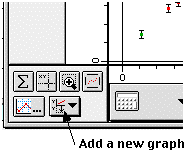 To
add a second (or more) graph to the graph window, click on the "Add
graph" pull down menu in the lower-left corner of the Graph Window.
You will need to select an input for the graph, but you can easily
change what quantities the graph
displays after it is created.
To
add a second (or more) graph to the graph window, click on the "Add
graph" pull down menu in the lower-left corner of the Graph Window.
You will need to select an input for the graph, but you can easily
change what quantities the graph
displays after it is created.