![[Up]](../APPhyNet/NavIcons/Up.GIF)
![[Home]](../APPhyNet/NavIcons/Home.GIF)
![[Help]](../APPhyNet/NavIcons/Help.GIF)
BHS -> Staff -> Mr. Stanbrough ->Pasco Interface Notes-> this page
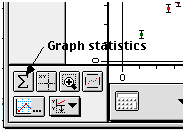 To
open the graph statistics window, click the statistics button
(
To
open the graph statistics window, click the statistics button
( )
in the lower-left corner of the graph window. from the statistics
menu (
)
in the lower-left corner of the graph window. from the statistics
menu ( ),
you can select as many of the following as you wish. The statistics
apply to all points on the graph (even if you have zoomed in
(
),
you can select as many of the following as you wish. The statistics
apply to all points on the graph (even if you have zoomed in
( )
on a particular region), or to a restricted
region of the graph, if it is selected.
)
on a particular region), or to a restricted
region of the graph, if it is selected.
BHS
-> Staff
-> Mr. Stanbrough ->Pasco
Interface Notes-> this page