|
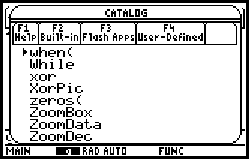
On the TI-89, you use the "when(" function to represent
piecewise functions. An easy way to access it is by pressing
The syntax is: when(condition, true statement, false statement) First, the calculator evaluates the "condition". If it is true, it executes the "true statement", and if not it executes the "false statement". |
 |
|
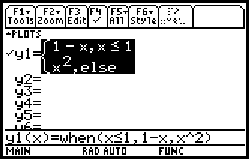
Here is an example, taken from Example 7 on p. 18 of the Stewart text: |
 |
|
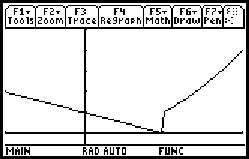
Here is the graph of f drawn in the window [-1, 2] by [-0.5, 5]. (Compare to Figure 19 on p. 18 of Stewart.) The vertical line is an unfortunate consequence of the fact that the calculator automatically connects all points on a graph. This problem is easily fixed, but keep in mind that it is your responsibility to understand that the calculator will not always draw correct graphs and to recognize that a graph is not correct. |
 |
|
The simplest fix is to tell the calculator not to
"connect the dots" on the graph. To do this, press
|
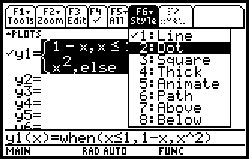 |
|
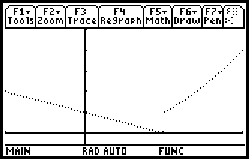
The graph at right has been redrawn ( |
 |
|
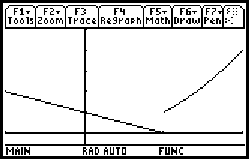
Sometimes the "standard" dotted graph can be difficult to
see. You can make it more solid by opening the window dialog
( If you want the graph really dark, you can go back to the
style menu ( |
 |
The "when(" function can be nested inside other "when(" functions to construct piecewise functions that have more than two pieces, but this can get pretty complex.
|
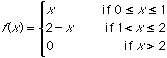
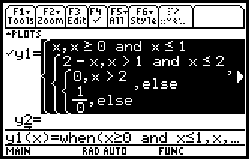
Suppose we want to represent the piecewise function from Stewart, Example 9, p, 20: A complication is that this function is not defined for x < 0. It can be accurately represented on the TI-89 using the following nested function:
The last term, "1/0", assures that the value of the function will be undefined whenever x is less than zero. |
 |
|
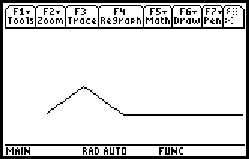
Here is the graph of the function in the window [-1,
5] by [-1, 3]. It is drawn without axes (Go to
the "F1 - Tools" menu on the "Y=" screen ( |
 |
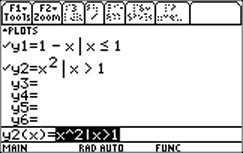
Instead of using the "When(" function, it is often possible to enter a piecewise function as a series of separate functions using the "|" operator. The function at right produces the same results as the first example. This doesn't always seem to work well, however. Try the last example, for instance. |
 |
 ,
then "w".
,
then "w".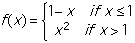

 to go to the "Y=" screen, then
 )
in dot mode. Note that the erroneous vertical segment is no
longer shown.
)
in dot mode. Note that the erroneous vertical segment is no
longer shown. )
and setting xres = 1. The result is shown at right.
)
and setting xres = 1. The result is shown at right.